






图片体积压缩工具源码
作者:小编日期:2026-01-19浏览:5151分类:只有源码
因为工作需要,需要压缩图片的大小,基本都是小于100K的,就压缩体积,用不着其他的功能,于是就有了这个代码,也可以自定义压缩多大,但是不那么精确,还导入多张图片
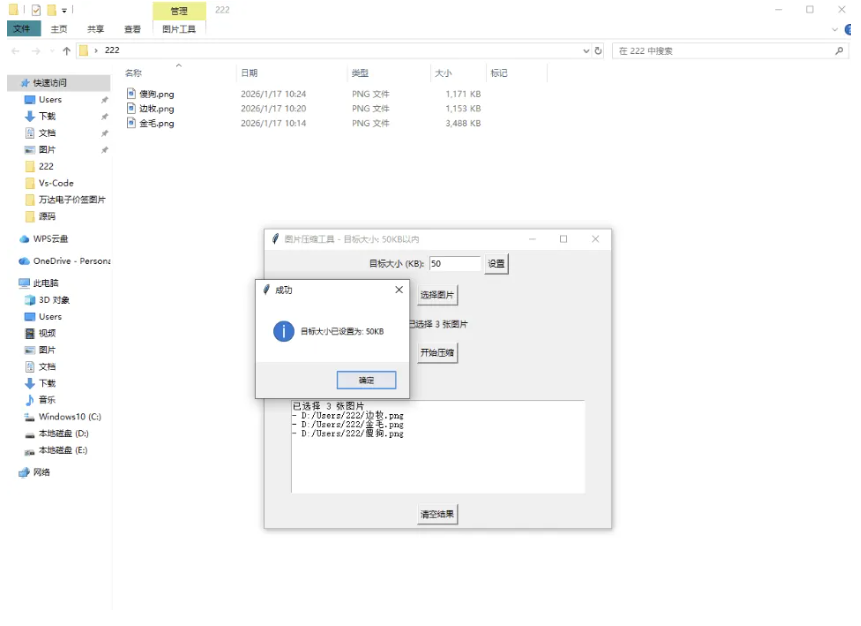
import tkinter as tk
from tkinter import filedialog, messagebox
from PIL import Image
import os
class ImageCompressor:
def __init__(self, root):
self.root = root
self.root.title("图片压缩工具 - 目标大小: 100KB以内")
self.root.geometry("500x400")
self.target_size = tk.IntVar(value=100)
self.create_widgets()
def create_widgets(self):
target_frame = tk.Frame(self.root)
target_frame.pack(pady=5)
tk.Label(target_frame, text="目标大小 (KB):").pack(side=tk.LEFT)
self.target_size_entry = tk.Entry(target_frame, width=10, textvariable=self.target_size)
self.target_size_entry.pack(side=tk.LEFT, padx=5)
tk.Button(target_frame, text="设置", command=self.set_target_size).pack(side=tk.LEFT)
self.select_btn = tk.Button(self.root, text="选择图片", command=self.select_images)
self.select_btn.pack(pady=10)
self.file_label = tk.Label(self.root, text="未选择图片", wraplength=400)
self.file_label.pack(pady=5)
self.compress_btn = tk.Button(self.root, text="开始压缩", command=self.compress_images, state=tk.DISABLED)
self.compress_btn.pack(pady=10)
self.progress_label = tk.Label(self.root, text="")
self.progress_label.pack(pady=5)
self.result_text = tk.Text(self.root, height=10, width=60)
self.result_text.pack(pady=10)
self.clear_btn = tk.Button(self.root, text="清空结果", command=self.clear_results)
self.clear_btn.pack(pady=5)
self.image_paths = []
def set_target_size(self):
"""设置目标压缩大小"""
try:
size = int(self.target_size.get())
if size <= 0:
messagebox.showerror("错误", "目标大小必须大于0KB")
return
if size > 10000:
messagebox.showwarning("警告", "目标大小过大,建议设置一个小于10MB的值")
self.root.title(f"图片压缩工具 - 目标大小: {size}KB以内")
messagebox.showinfo("成功", f"目标大小已设置为: {size}KB")
except ValueError:
messagebox.showerror("错误", "请输入有效的数字")
def select_images(self):
file_paths = filedialog.askopenfilenames(
title="选择要压缩的图片",
filetypes=[
("Image files", "*.jpg *.jpeg *.png *.bmp *.tiff *.webp"),
("All files", "*.*")
]
)
if file_paths:
self.image_paths = list(file_paths)
self.file_label.config(text=f"已选择 {len(self.image_paths)} 张图片")
self.compress_btn.config(state=tk.NORMAL)
self.result_text.insert(tk.END, f"已选择 {len(self.image_paths)} 张图片\n")
for path in self.image_paths:
self.result_text.insert(tk.END, f"- {path}\n")
def compress_images(self):
if not self.image_paths:
messagebox.showerror("错误", "请选择至少一张图片")
return
total_images = len(self.image_paths)
success_count = 0
for i, image_path in enumerate(self.image_paths):
try:
self.progress_label.config(text=f"正在处理第 {i+1}/{total_images} 张图片...")
self.root.update()
original_size = os.path.getsize(image_path) / 1024
self.result_text.insert(tk.END, f"\n处理图片: {os.path.basename(image_path)}\n")
self.result_text.insert(tk.END, f"原始大小: {original_size:.2f} KB\n")
img = Image.open(image_path)
if img.mode in ('RGBA', 'LA', 'P'):
img = img.convert('RGB')
output_path = self.generate_output_path_batch(image_path)
quality = 95
while True:
img.save(output_path, "JPEG", optimize=True, quality=quality)
compressed_size = os.path.getsize(output_path) / 1024
self.progress_label.config(text=f"正在处理: {os.path.basename(image_path)}, 当前质量: {quality}, 大小: {compressed_size:.2f}KB")
self.root.update()
if compressed_size <= self.target_size.get() or quality <= 10:
break
if compressed_size > self.target_size.get() * 1.5:
quality -= 15
elif compressed_size > self.target_size.get() * 1.2:
quality -= 8
else:
quality -= 5
quality = max(quality, 10)
final_size = os.path.getsize(output_path) / 1024
self.result_text.insert(tk.END, f"最终质量: {quality}, 最终大小: {final_size:.2f} KB\n")
if final_size <= self.target_size.get():
self.result_text.insert(tk.END, f"✅ 压缩成功! 文件已保存至: {output_path}\n")
success_count += 1
else:
self.result_text.insert(tk.END, f"⚠️ 无法压缩到{self.target_size.get()}KB以下,最低压缩到: {final_size:.2f} KB\n")
self.root.update()
except Exception as e:
self.result_text.insert(tk.END, f"❌ 压缩失败: {str(e)}\n")
messagebox.showerror("错误", f"压缩过程中出现错误: {str(e)}")
self.progress_label.config(text="完成!")
messagebox.showinfo("完成", f"批量压缩完成!\n总共处理: {total_images} 张图片\n成功压缩: {success_count} 张图片\n无法压缩到{self.target_size.get()}KB以下: {total_images - success_count} 张图片")
def generate_output_path_batch(self, input_path):
"""为批量处理生成输出文件路径"""
base_name, ext = os.path.splitext(input_path)
counter = 1
while True:
output_path = f"{base_name}_compressed_{counter}.jpg"
if not os.path.exists(output_path):
return output_path
counter += 1
def generate_output_path(self):
"""生成输出文件路径"""
base_name, ext = os.path.splitext(self.image_path)
counter = 1
while True:
output_path = f"{base_name}_compressed_{counter}.jpg"
if not os.path.exists(output_path):
return output_path
counter += 1
def clear_results(self):
self.result_text.delete(1.0, tk.END)
def compress_image(self):
pass
if __name__ == "__main__":
root = tk.Tk()
app = ImageCompressor(root)
root.mainloop()
相关文章
- 10-26 豆包去水印网页源码程序
- 10-26 最新2077高定网址导航系统源码 全开源
- 10-26 一键部署星播直播系统源码
- 10-26 吃瓜主题3.0视频源码
- 10-25 海洋个人引导页4迎新版【开源】
- 10-25 聚绘阁最app下载页源码
- 10-17 Ai一句话生成网站带卡密续费功能
- 10-17 ZO论坛盒子正式开源:基于 Electron 的 Discuz 桌面客户端,附后台接口与部署文档
- 10-16 IDC虚拟主机系统免费无加密可直接运营
- 10-16 白小泽DNS域名分发系统 公测版 v1.0.0
- 10-13 一套纯 PHP + MySQL 编写的完整「应用市场 / APP 下载站」
- 10-12 AI综合站 全功能源码 v3.0(三端自适应+安装向导)
取消回复欢迎你发表评论:

- 协助本站优化一下
- 最近发表
- 1自媒体运营爆款技巧,抖音直播挂铁黑科技兵马俑软件下载入口,招募合伙人
- 2豆包去水印网页源码程序
- 3最新2077高定网址导航系统源码 全开源
- 4一键部署星播直播系统源码
- 5网络检测工具箱1.1 [含源码]
- 6Jync 捷同V1.8.0 - 极简、极速的异构数据库实时同步工具
- 7吃瓜主题3.0视频源码
- 8高德地图v17.02.0.1541内置净化模块 去广告 更省电 界面可自定义
- 9海洋个人引导页4迎新版【开源】
- 10抖音博主作品批量下载器V1.1
- 11极速设置v1.0.6解锁版 快捷指令 扫码 签到 各种设置等一键执行
- 12聚绘阁最app下载页源码
- 13续费藏挺深啊v1.6.7 找出手机自动续费扣费项 避免悄悄被扣费
- 14一起来揭秘!抖音黑科技挂铁兵马俑涨粉主站真的有那么神奇吗?
- 15外面收费999的抖音黑科技软件免费分享给大家,我靠它年赚百万!
Copyright© XGW9.COM版权所有〖小庚资源网〗
〖恒创科技〗为本站提供专业云计算服务
本站发布的内容来源于互联网,如果有侵权内容,请联系我们删除!E-mail:xgzyw6@outlook.com
关于我们|我要投稿|免责声明|XML地图
暂无评论,来添加一个吧。